
Sort, Segment, and Sequence Project
A window function preserves every row and adds a value calculated across related rows. To produce numbering within groups, the plan must arrange the stream, recognize where each group changes, and maintain the sequence state.
Sort, Segment, and Sequence Project can appear together for those three tasks. No single operator describes the entire function written in the query.
The query defines groups and order
This query numbers orders within each status. PARTITION BY restarts numbering when Estado changes; ORDER BY defines the sequence inside the group.
Before execution, enable Include Actual Execution Plan with Ctrl+M. When the query finishes, open Execution plan and follow the branch from Sort to Segment and Sequence Project. If an index already provides the required order, SQL Server may omit Sort; inspect the actual plan instead of assuming that all three names must appear.
SELECT
    p.IdPedido,
    p.Estado,
    p.FechaPedido,
    ROW_NUMBER() OVER
    (
        PARTITION BY p.Estado
        ORDER BY p.FechaPedido, p.IdPedido
    ) AS Posicion
FROM dbo.PedidoLaboratorio AS p
OPTION (MAXDOP 1, RECOMPILE);
A window function calculates a value across a related set without reducing it to one row per group. A partition delimits those sets; the window order defines how each set is traversed.
Sort: preparing the required order
Sort receives rows and returns them ordered by one or more expressions. Here it must produce the order composed of Estado, FechaPedido, and IdPedido.
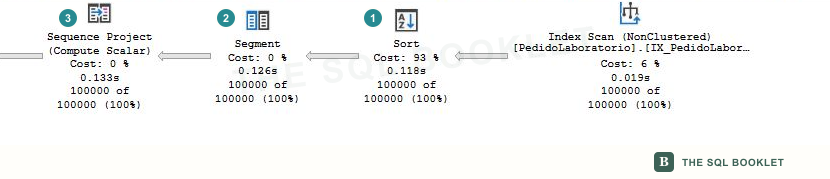
- 1Ordering
Sortarranges the rows before the sequence can be calculated. - 2Partition boundary
Segmentrecognizes whenEstadochanges and marks the beginning of the next group. - 3Sequence value
Sequence Projectuses that marker and adds the position calculated byROW_NUMBER.
Order can also come from an index. If no Sort appears, inspect the preceding access operator’s Ordered property and keys instead of assuming the function no longer requires order.
Sort often requests a memory grant. Order By, observed rows, granted memory, and warnings show what was sorted and whether the work remained in memory.
Segment: marking the start of each group
Segment compares segmentation columns between consecutive rows and marks the beginning of a new group. It neither collapses rows nor calculates the number: it preserves the stream and adds the signal needed by the next operator.
The Group By property shows the columns used to detect the change. Here, Estado defines each partition boundary. Without PARTITION BY, all rows would belong to one logical group for numbering.
The input must arrive in an order that keeps group rows together. Read Segment together with the order produced or preserved by the preceding branch.
Sequence Project: adding the sequence value
Sequence Project calculates expressions that depend on order and on state maintained as rows advance. Here it produces ROW_NUMBER.
Defined Values identifies the internal column it adds. The operator receives the Segment marker, increments the sequence for each row, and restarts it when another partition begins.
It is not an aggregate: it returns the same rows it receives, now with a calculated column. It also does not choose the order; it uses the order already prepared by its input.
Reading the three operators as a chain
| Step | Receives | Produces |
|---|---|---|
Sort |
Rows without the required order | Rows ordered by partition and sequence |
Segment |
Ordered rows | A marker when another group begins |
Sequence Project |
Rows and group markers | The same rows with the window value |
First confirm the order columns. Then inspect which column delimits the group. Finally identify the value defined by Sequence Project.
What this still does not establish
These operators do not prove that the query is poorly designed. The order and numbering may be required by the result. A different index might avoid a Sort, but it would also add storage and write cost.
Evaluating impact requires rows, memory, spills, execution frequency, and alternatives that preserve the same result.
Next reasonable check
Continue with Stream Aggregate and Hash Match (Aggregate) to compare two mechanisms that collapse rows into one result per group.