
Build a repeatable baseline
A single measurement describes one execution. A baseline preserves the relevant conditions, repeats the query, and records its normal variation before anything changes.
What makes a comparison repeatable
A baseline is not the fastest observed time or a number that must repeat exactly. It is a documented reference that allows the same test to be run again.
Record the query text and parameters, database and data, compatibility level, indexes and statistics, session options, the chosen cache condition, concurrent load, and the client used to run the query. A change in any of these conditions belongs in the record.
Prepare one execution before measuring
The first execution may perform work that later runs reuse. This test runs the same query once as preparation and then records five measurements. Run the complete batch together: the first visible query alone returns only Resultado; the five-row table appears because the batch stores every measurement in @Mediciones.
SET NOCOUNT ON;

DECLARE @Desde date = '2025-01-01';
DECLARE @Resultado decimal(38, 4);

-- Preparation: this execution is not added to the final table.
SELECT
    @Resultado = SUM(CONVERT(decimal(38, 4), p.Total * f.Factor))
FROM dbo.PedidoLaboratorio AS p
CROSS JOIN
(
    VALUES (1), (2), (3), (4), (5), (6), (7), (8)
) AS f(Factor)
WHERE p.FechaPedido >= @Desde
OPTION (MAXDOP 1);

DECLARE @Mediciones TABLE
(
    Ejecucion  tinyint       NOT NULL,
    Desde      date          NOT NULL,
    Inicio     datetime2(3)  NOT NULL,
    DuracionMs int           NOT NULL,
    Resultado  decimal(38,4) NOT NULL
);

DECLARE @Ejecucion tinyint = 1;
DECLARE @Inicio datetime2(3);

WHILE @Ejecucion <= 5
BEGIN
    SET @Inicio = SYSDATETIME();

    SELECT
        @Resultado = SUM(CONVERT(decimal(38, 4), p.Total * f.Factor))
    FROM dbo.PedidoLaboratorio AS p
    CROSS JOIN
    (
        VALUES (1), (2), (3), (4), (5), (6), (7), (8)
    ) AS f(Factor)
    WHERE p.FechaPedido >= @Desde
    OPTION (MAXDOP 1);

    INSERT INTO @Mediciones
        (Ejecucion, Desde, Inicio, DuracionMs, Resultado)
    VALUES
        (
            @Ejecucion,
            @Desde,
            @Inicio,
            DATEDIFF(MILLISECOND, @Inicio, SYSDATETIME()),
            @Resultado
        );

    SET @Ejecucion += 1;
END;

SELECT
    Ejecucion,
    Desde,
    Inicio,
    DuracionMs,
    Resultado
FROM @Mediciones
ORDER BY Ejecucion;
Preparation belongs to the method but not to the measured series. Clearing a shared cache is not required and may affect other sessions while creating an unrepresentative condition.
Where the table appears in SSMS
Open a query window against the database that contains dbo.PedidoLaboratorio, paste the complete batch, and run it with F5. An actual execution plan is not required for this evidence. Open Results when the batch finishes: one grid should contain five rows and the Ejecucion, Desde, Inicio, DuracionMs, and Resultado columns.
Inicio and DuracionMs change on every run. The screenshot records one specific test and its timings are not targets for another machine. The result should remain stable across all five rows while the data and parameter remain unchanged.
Record several executions
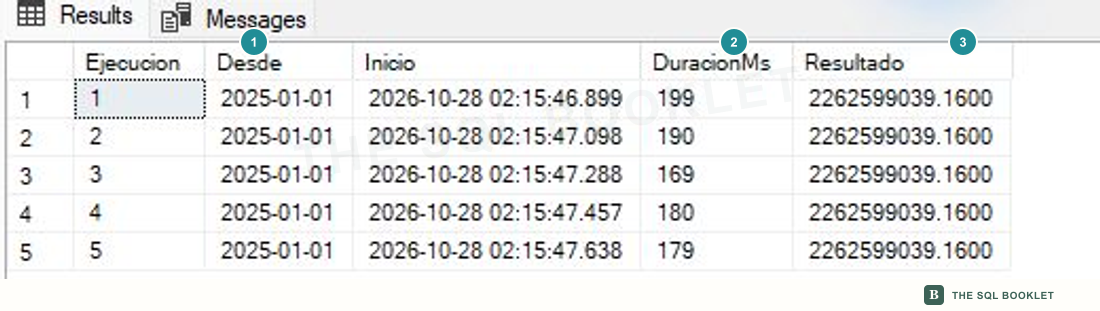
- 1The same input
All five rows keep the
2025-01-01parameter. - 2Observed variation
Durations range from 169 to 199 ms. The median is 180 ms; selecting only 169 ms would hide the series' normal variation.
- 3A stable result
Every execution returns
2262599039.1600. Performance comparisons begin by confirming that the query still solves the same problem.
Median and range describe the series
The median is the middle value after ordering the measurements. In a small series it is less sensitive than the average to an occasional high or low execution. The range preserves the observed extremes.
For 169, 179, 180, 190, and 199 ms, the median is 180 ms and the range is 169–199 ms. These values describe this test, not a universal threshold for another machine, volume, or concurrent load.
Change one variable
After the baseline is established, change one predicate, index, statistic, or option and repeat the same method. Changing several conditions at once prevents the observed difference from being attributed to one cause.
Collect at least the result, plan, reads, CPU, duration, and execution count. An improvement in one metric may add cost to another query, to writes, or to storage.
What we can conclude
The test preserves the query and parameter, returns the same result five times, and records a 169–199 ms range. It establishes a repeatable reference for this condition; it does not yet prove that a change is better.
A reasonable next check
The next entry saves two plans and opens Compare Showplan to inspect the strategy change without treating cost percentages as performance measurements.