
Key Lookup and repeated work
An index can locate the requested rows without containing every column needed by the query. SQL Server then uses the locator stored in that index to return to the complete row. The plan represents that second access as a Key Lookup.
What a Key Lookup is
Key is the clustered key that identifies the row. When a table has a clustered index, its nonclustered indexes keep that key as a row locator even when it is not written among their included columns.
Lookup is the retrieval of columns missing from the index used for the search. SQL Server takes the locator found in the nonclustered index, enters the clustered index, and retrieves the rest of the row.
A Key Lookup normally appears under Nested Loops. Nested Loops receives one row from the first access and requests the second access with that row’s key. If the first access returns 90 locators, the Key Lookup may execute 90 times.
What each structure contains
The example uses a temporary table with 100,000 orders and two indexes:
PK_PedidoLookupis the clustered index onIdPedido. Its leaf level contains the complete rows.IX_PedidoLookup_IdClienteis a nonclustered index onIdCliente. It also keepsIdPedidoas its locator, but does not includeEstadoorTotal.
The query filters by IdCliente and also requests Estado and Total.
IF OBJECT_ID(N'tempdb..#PedidoLookup', N'U') IS NOT NULL
    DROP TABLE #PedidoLookup;

CREATE TABLE #PedidoLookup
(
    IdPedido  INT NOT NULL,
    IdCliente INT NOT NULL,
    Estado    VARCHAR(20) NOT NULL,
    Total     DECIMAL(12, 2) NOT NULL,
    CONSTRAINT PK_PedidoLookup
        PRIMARY KEY CLUSTERED (IdPedido)
);

INSERT INTO #PedidoLookup
    (IdPedido, IdCliente, Estado, Total)
SELECT
    p.IdPedido,
    p.IdCliente,
    p.Estado,
    p.Total
FROM dbo.PedidoLaboratorio AS p;

CREATE INDEX IX_PedidoLookup_IdCliente
    ON #PedidoLookup (IdCliente);

DECLARE @ClienteInicial INT = 1;
DECLARE @ClienteFinal INT = 10;

SELECT
    p.IdPedido,
    p.IdCliente,
    p.Estado,
    p.Total
FROM #PedidoLookup AS p
WHERE p.IdCliente BETWEEN @ClienteInicial AND @ClienteFinal
ORDER BY
    p.IdCliente,
    p.IdPedido
OPTION (RECOMPILE);

DROP TABLE #PedidoLookup;
OPTION (RECOMPILE) makes it possible to observe the plan compiled for this range. It is used for this check; it is not a general recommendation for application queries. See OPTION and query hints to distinguish this test control from a decision that will remain in production.
Run the complete block in a new query window. Enable Include Actual Execution Plan with Ctrl+M first. When execution finishes, open Execution plan and locate the Index Seek → Nested Loops → Key Lookup chain. The temporary table exists only in this connection, and the block removes it when the test ends.
How the plan is formed
The plan is read from the access operators on the right toward the result on the left.
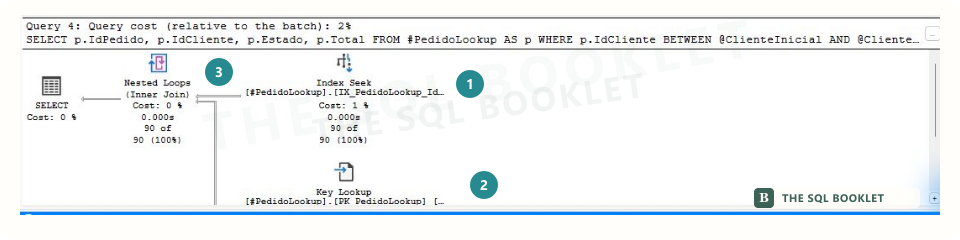
- 1INDEX SEEK
Finds 90 IdCliente entries and returns the IdPedido that identifies each row.
The index is narrow: it does not yet contain Estado or Total.
- 2KEY LOOKUP
Uses each IdPedido to return to the clustered index and retrieve Estado and Total.
One retrieval returns one row; in this execution it repeats 90 times.
- 3NESTED LOOPS
Coordinates both accesses: for each locator it receives, it requests one retrieval.
The result combines the columns found in both structures.
Index Seek uses IX_PedidoLookup_IdCliente to locate the customer range. It returns 90 rows containing IdCliente and IdPedido.
Nested Loops takes each IdPedido and requests one retrieval. Key Lookup uses that key to enter PK_PedidoLookup and obtain Estado and Total. The result combines columns from both accesses.
The operation did not appear because SQL Server created an index during execution. Both indexes existed when the query was compiled. The optimizer combined the narrow index that supports the IdCliente search with the clustered index that contains the complete row.
Why the number of executions matters
One Key Lookup retrieves one row. The accumulated work depends on how many times it is requested.

In the observed execution:
| Property | Value | What it describes |
|---|---|---|
Actual Number of Rows for All Executions |
90 | Rows returned by the operator across all executions. |
Number of Executions |
90 | Times Nested Loops requested the retrieval. |
Object |
PK_PedidoLookup |
Clustered index accessed by the operator. |
Output List |
Estado, Total |
Columns retrieved because they were absent from the first index. |
The relationship is direct in this case: 90 locators produce 90 executions, and each execution returns one row. The values may differ in another plan; inspect the properties instead of inferring them from the diagram.
When it can be reasonable
A Key Lookup can be an efficient way to complete a small number of rows. Keeping a nonclustered index narrow reduces its size and may make the initial search easier. If the query is infrequent and returns few locators, the second access may cost less than maintaining another wider structure.
Its presence does not prove a problem by itself. The operator name describes how the missing columns were obtained.
When it deserves review
The access deserves closer review when several conditions occur together:
- the first operator returns many rows;
Number of Executionsshows many retrievals;- the query runs frequently;
- reads, duration, or CPU increase with that pattern;
- the actual row count is substantially higher than the estimate.
The cost percentage shown in the plan is a relative estimate within that plan. It does not replace execution measurements and cannot compare different queries by itself.
What covering the query means
An index covers a query when it contains the keys needed for searching and every column needed to filter, join, and return the result. SQL Server can then complete the query without returning to the clustered row.
Columns added with INCLUDE remain at the leaf level of a nonclustered index and can complete its coverage without becoming part of the ordered key. Including Estado and Total in this index could remove the Key Lookup for this specific query shape.
That does not make INCLUDE an automatic correction. Every column widens the index, consumes storage, and adds write and maintenance work. Before changing it, review similar indexes, query frequency, requested columns, row counts, and modification cost.
What to verify before changing an index
- Confirm in the actual plan how many times the
Key Lookupexecuted. - Inspect the columns listed in
Output List. - Measure reads, CPU, and duration under a representative workload.
- Check whether an index with an equivalent key or coverage already exists.
- Consider the
INSERT,UPDATE, andDELETEoperations that would maintain a wider structure. - Repeat the measurements after the change and keep a rollback path.
Reducing the requested columns or reviewing why the query retrieves so many rows may also be reasonable. The appropriate alternative depends on the need that produced the plan.
What this still does not establish
The case demonstrates how a narrow nonclustered index and a clustered index can be combined through Nested Loops. It does not demonstrate that every Key Lookup must be removed or that adding columns to an index always improves the system.
To assess its impact, relate executions, reads, and frequency to the complete workload. A repeated retrieval may dominate one query; an occasional retrieval may be the lowest-cost choice.
Reasonable next check
Continue with Filter, Compute Scalar, and Top to recognize operators that transform, limit, or discard rows before the flow continues.