
Read a Missing Index suggestion in an execution plan
A Missing Index suggestion means the optimizer found a hypothetical structure for which it estimated a lower query cost. The signal deserves review, but it does not prove that the index should be created or that the displayed percentage will become the same improvement in elapsed time.
Produce the suggestion in SSMS
The query filters by status and total, groups by customer, and sorts the highest amounts:
SELECT TOP (10)
    p.IdCliente,
    COUNT_BIG(*) AS Pedidos,
    SUM(p.Total) AS Importe
FROM dbo.PedidoLaboratorio AS p
WHERE p.Estado = 'Enviado'
  AND p.Total BETWEEN 1200.00 AND 1210.00
GROUP BY p.IdCliente
ORDER BY Importe DESC;
Enable Include Actual Execution Plan with Ctrl+M, run the query, and open Execution plan. SSMS places the suggestion in green text above the tree.
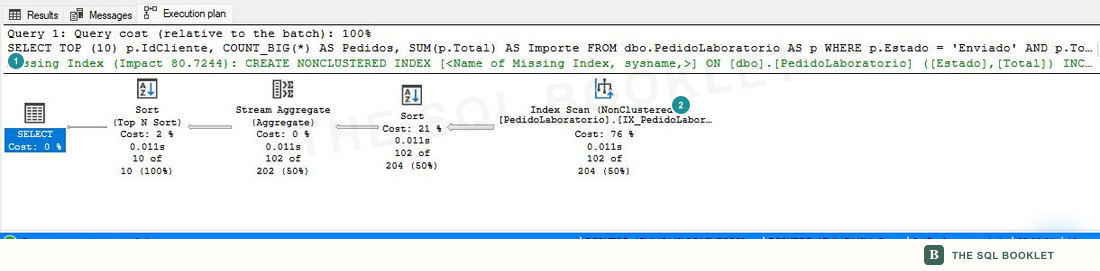
- 1Estimated suggestion
The green line identifies the table, proposed columns, and an estimated impact of
80.7244. - 2Access that was used
The executed plan still contains an
Index Scanon an existing structure; the suggestion did not replace the plan during this execution.
A hypothetical index is a structure the optimizer considers when costing another alternative without creating it physically. This is why the line can appear alongside the plan that actually ran.
Interpret the impact percentage
The Impact value compares the estimated cost of the current plan with the cost the optimizer calculated while considering the proposed structure. It is a comparison inside the cost model for that compilation.
The percentage does not represent:
- measured time saved with a clock;
- a guaranteed reduction in CPU or reads;
- a benefit for every query that uses the table;
- the cost of maintaining the index during
INSERT,UPDATE, andDELETE; - storage, redundancy, or overlap with existing indexes.
A high estimate helps prioritize the investigation. The decision still requires measuring the performed work and reviewing the complete set of indexes.
Open Missing Index Details
Right-click an empty area of the plan and select Missing Index Details….

- 1Details available
The action opens another tab with a proposed statement; it does not create the index.
The new tab keeps the proposal inside a comment:
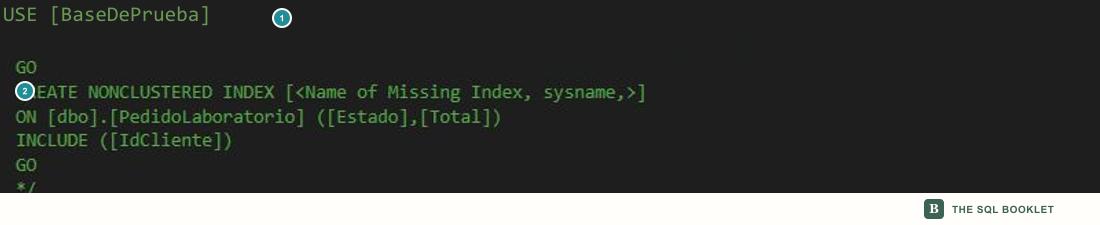
- 1Commented block
The
/*and*/delimiters prevent the statement from running when the tab opens. - 2Proposed columns
EstadoandTotalform the suggested key;IdClienteappears inINCLUDE.
Do not run the statement as an automatic step. The next entry explains how that CREATE INDEX is formed; it will then need to be compared with current indexes, given a valid name, and measured.
Read the request in Showplan XML
Right-click an empty area of the graph and select Show Execution Plan XML. Find MissingIndexes in the document.
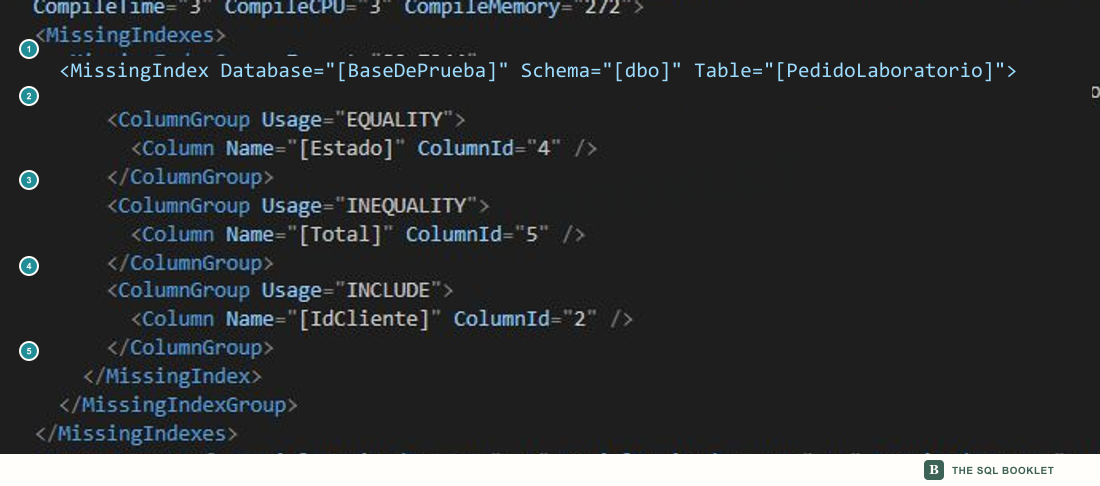
- 1
MissingIndexesContains the index requests associated with the statement.
- 2
MissingIndexGroupandMissingIndexThe group preserves estimated impact; the inner element identifies database, schema, and table.
- 3
EQUALITYEstadoparticipates in an equality comparison. - 4
INEQUALITYTotalparticipates in the range requested withBETWEEN. - 5
INCLUDEIdClienteis requested as an included column so required data can be covered without becoming part of the proposed key.
EQUALITY, INEQUALITY, and INCLUDE describe the role of columns in the request. They do not determine the final order among several equality or inequality columns, nor do they prove that the structure is suitable for other queries.
The green line may show only one request
One statement can produce more than one request. This query combines two counts with different filters:
SELECT
    (
        SELECT COUNT_BIG(*)
        FROM dbo.PedidoLaboratorio AS p
        WHERE p.Estado = 'Enviado'
          AND p.Total BETWEEN 1200.00 AND 1210.00
    ) AS PedidosPorEstado,
    (
        SELECT COUNT_BIG(*)
        FROM dbo.PedidoLaboratorio AS p
        WHERE p.IdCliente BETWEEN 1000 AND 1100
          AND p.Total >= 1500.00
    ) AS PedidosPorCliente;
Run the query with the actual plan enabled. The graph keeps both branches, but the green text presents one suggestion.
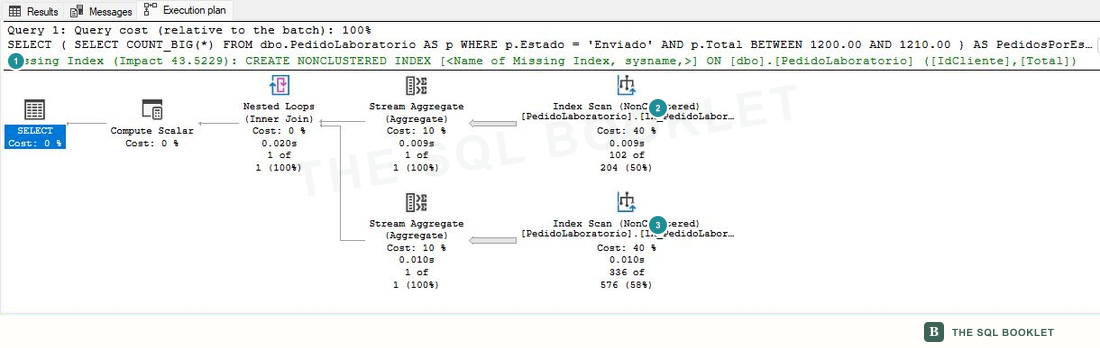
- 1Visible line
SSMS shows the proposal for
IdClienteandTotal. - 2First branch
Resolves the count filtered by
EstadoandTotal. - 3Second branch
Resolves the count filtered by
IdClienteandTotal.
The XML exposes both requests:

- 1Customer request
Proposes
IdClienteandTotalas inequality columns, with an estimated impact of43.5229. - 2Status request
Keeps
Estadoas equality andTotalas inequality, with an estimated impact of43.2071.
The green line is a shortcut, not a complete inventory. When a plan has several branches or statements, the XML lets you verify how many groups were recorded and which columns belong to each one.
Keep signal and decision separate
The review can be recorded without turning the suggestion into an order:
- Observation: the plan shows an
Index Scanand a suggestion with estimated impact80.7244. - Hypothesis: a structure with
EstadoandTotalas its key andIdClienteincluded may reduce the read work for this query. - Pending check: review existing indexes, selectivity, writes, storage, reads, and timing before and after the change.
- Limit: the suggestion comes from one compilation and does not evaluate the total cost for the workload by itself.
Next reasonable check
The next entry breaks down the statement generated by Missing Index Details: name, key columns, included columns, and the decisions SQL Server leaves open before an index is created.
Related topics
- How Showplan XML is organized: locate the request inside the document.
- Reads with SET STATISTICS IO: measure read work before evaluating a change.
- Review missing-index suggestions: query the observations accumulated by the DMVs.
- Review index usage: compare reads and maintenance for existing structures.
- Turn a scenario into a hypothesis: keep the signal, test, and conclusion separate.