
Save and compare two plans
Two queries can return the same result through different strategies. Saving each plan as .sqlplan preserves the evidence and lets Compare Showplan align both structures.
Save evidence that can be opened again
A .sqlplan file contains Showplan XML. It can preserve operators, properties, statement text, and runtime counters. Review object names, predicates, literals, and other sensitive data before sharing it.
In SSMS, Save Execution Plan As is available from the plan canvas. Open one file and use Compare Showplan to choose the second. The top and bottom positions identify the files; they do not automatically mean “before” and “after.”
How to produce and open the comparison
- Open a query window connected to the database that contains
dbo.PedidoLaboratorio. - Enable Include Actual Execution Plan with
Ctrl+M. - Run only the first query. Results should contain
136, while Execution plan contains that query’s plan. - Right-click an empty area of the plan, choose Save Execution Plan As, and save the file with a name that identifies the direct predicate.
- Run only the second query and save its plan under another name.
- Open either
.sqlplanthrough File → Open → File. Right-click its canvas, choose Compare Showplan, and select the other file.
SSMS places one plan above the other. Verify the statement text before deciding which query occupies each position. Selecting equivalent operators exposes their top and bottom properties; press F4 if the Properties panel is not visible.
Two queries with the same result
The first query compares the date directly:
DECLARE @Desde date = '2025-01-01';

SELECT COUNT_BIG(*) AS Pedidos
FROM dbo.PedidoLaboratorio AS p
WHERE p.FechaPedido >= @Desde
OPTION (RECOMPILE);
The second transforms the column before comparing it:
DECLARE @Desde date = '2025-01-01';

SELECT COUNT_BIG(*) AS Pedidos
FROM dbo.PedidoLaboratorio AS p
WHERE DATEDIFF(DAY, @Desde, p.FechaPedido) >= 0
OPTION (RECOMPILE);
Both return 136 orders. Result equivalence is the starting point, not the performance conclusion.
Compare Showplan aligns the strategies
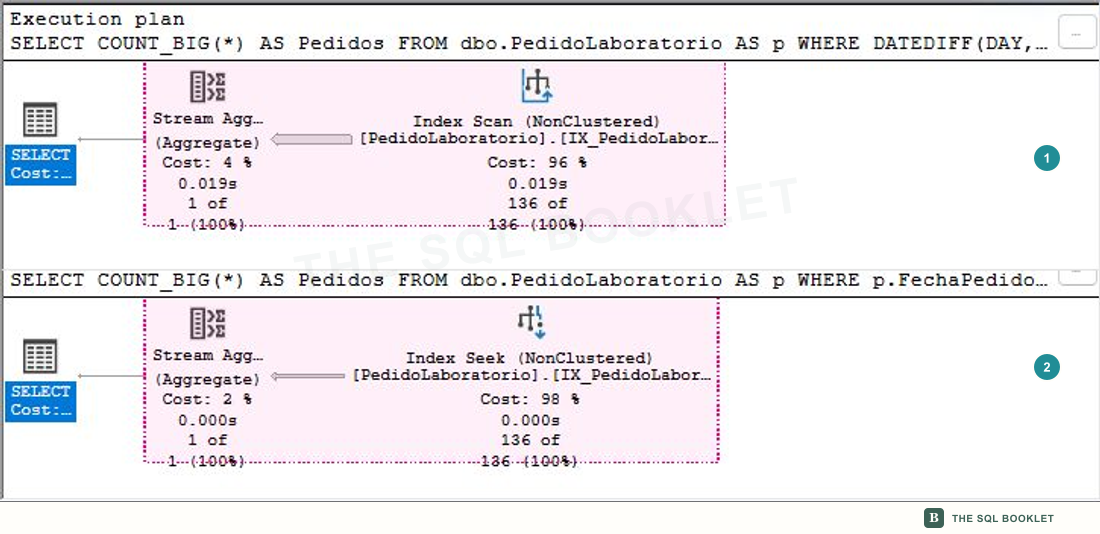
- 1Top plan
The query that transforms the column uses an
Index Scanand reads the index before retaining 136 rows. - 2Bottom plan
The direct predicate permits an
Index Seekon the same index and returns the same 136 rows.
The comparison view locates branches and structural differences. It does not establish which alternative used fewer reads, CPU, or elapsed time.
Properties remain side by side
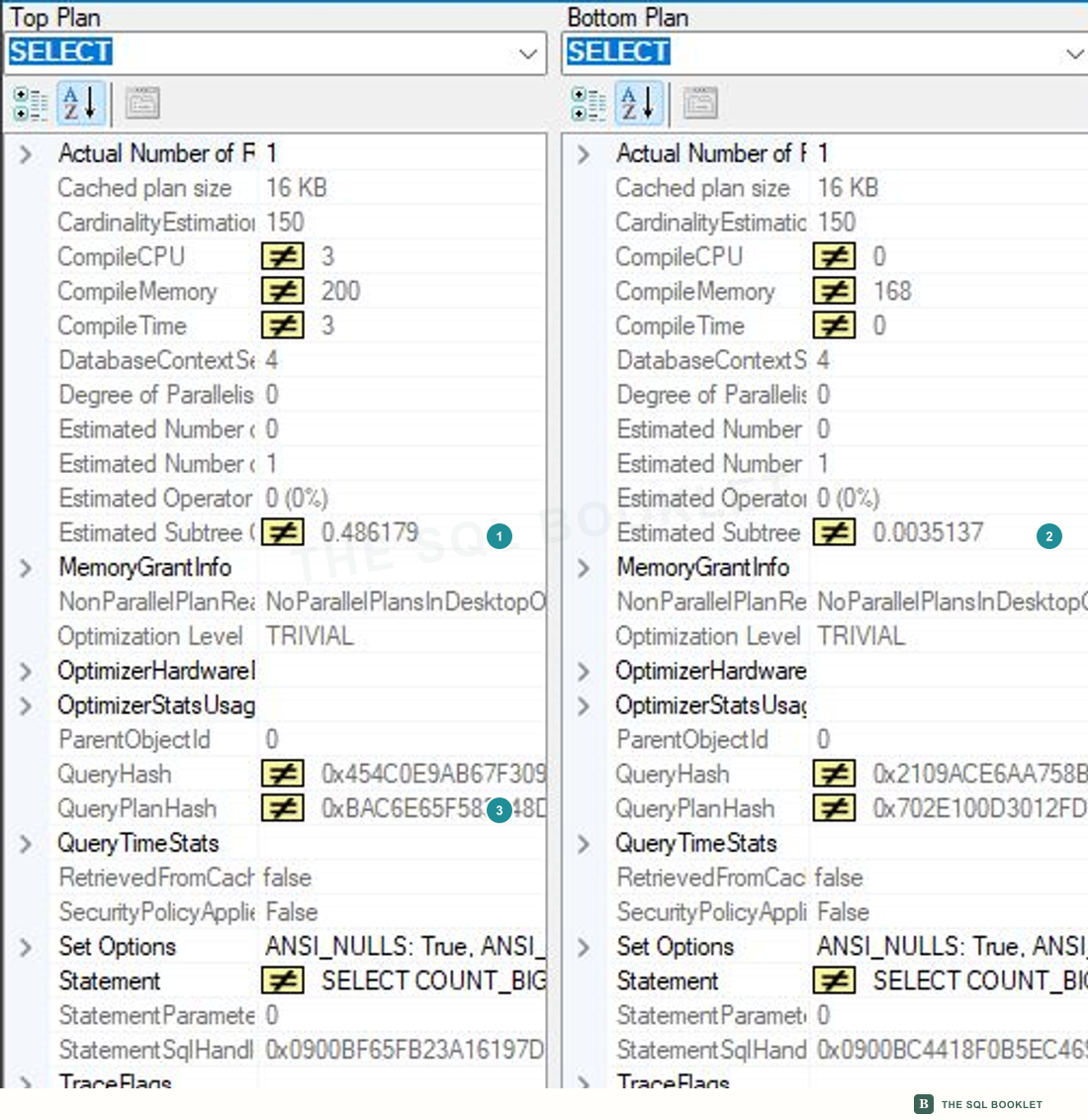
- 1Top estimated cost
The
Index Scanplan shows an estimated subtree cost of0.486179. - 2Bottom estimated cost
The
Index Seekplan shows0.0035137. These are optimizer units, not milliseconds. - 3Plan identity
Each side has a different
QueryPlanHash, so these are not the same saved plan.
Also compare rows read and returned, predicates, warnings, memory, and execution counts. A cost percentage does not replace a baseline.
Comparing does not approve a change
The Scan–Seek difference produces a hypothesis: the direct predicate appears to require less work. Test it again with reads, CPU, and elapsed time, and confirm that the rewritten predicate preserves meaning for all relevant parameters.
What we can conclude
The saved files show two strategies for the same result. Compare Showplan aligns their structures and properties, but the decision still requires observed metrics and documented conditions.
A reasonable next check
The next entry uses Query Store to associate plans with time intervals and runtime statistics rather than relying on two manually selected files.