
Index Seek, Index Scan, and Table Scan
Two queries can return the same row while traversing different structures to find it. The operator name summarizes that access; its properties show how much it read, what it returned, and which condition it applied.
Index Seek: search within an index
Index means that SQL Server uses an index that already exists. Seek means that it can use the order of one or more keys to navigate to a value or a bounded range.
The operator does not need to start at the first entry and inspect every entry that follows. It navigates through the index levels, locates the point where reading can begin, and stops when the requested range ends.
An Index Seek can return one row or many rows. What distinguishes it is not the final row count, but that the condition provides usable boundaries for entering a specific part of the index.
Index Scan: traverse an index
Index Scan also uses a preexisting index, but traverses it to inspect its entries. Depending on the plan and the condition, it can read the entire index or a broad part of it before deciding which rows to keep.
The scanned index can be smaller than the table and can contain every requested column. An Index Scan can therefore be a reasonable choice; the word Scan does not prove by itself that a problem exists.
Table Scan: traverse a table without a clustered index
Table Scan reads the data pages of a table stored as a heap, which means a table without a clustered index. Because no clustered structure organizes its rows by a key, SQL Server traverses the required pages and applies the condition to the rows it finds.
If the table has a clustered index and SQL Server decides to traverse it, the plan shows Clustered Index Scan, not Table Scan. Both are traversals; the structure that contains the rows is different.
| Operator | Structure it reads | Access method |
|---|---|---|
Index Seek |
Clustered or nonclustered index | Navigates to a key or bounded range. |
Index Scan |
Clustered or nonclustered index | Traverses index entries and keeps those that satisfy the condition. |
Table Scan |
Heap | Traverses the table’s data pages directly. |
Seek or Scan?
When reviewing an access operator, separate four facts:
- the expression written in the
WHEREclause; - the structure that existed before compilation;
- the operator selected by SQL Server;
- the rows read and the rows returned by that operator.
Index Seek, Index Scan, and Table Scan describe access methods. By themselves, they do not classify a query as correct, fast, or slow.
The available structures
In this example, dbo.PedidoLaboratorio has two relevant indexes:
PK_PedidoLaboratorio, a primary key implemented as a clustered index onIdPedido;IX_PedidoLaboratorio_FechaPedido, a nonclustered index onFechaPedidothat includesIdCliente,Estado, andTotal.
An index keeps values organized by a key so it can provide access paths. At the leaf level, a clustered index contains the table rows organized by that key. A nonclustered index keeps a separate ordered structure and uses the clustered key to locate the corresponding row.
The PK_ and IX_ prefixes are naming conventions. They help identify the intention of the person who created the object, but they do not replace inspecting its definition: a name does not prove which columns it contains or whether the index is clustered.
Two expressions that find the same order
Both queries return order 75000. The first compares INT values directly. The second transforms the column to text before comparing it.
DECLARE @IdPedido INT = 75000;

-- Direct comparison against the indexed key.
SELECT
    p.IdPedido,
    p.IdCliente,
    p.FechaPedido,
    p.Estado,
    p.Total
FROM dbo.PedidoLaboratorio AS p
WHERE p.IdPedido = @IdPedido
OPTION (RECOMPILE);

-- The same search transforms the column before comparing it.
SELECT
    p.IdPedido,
    p.IdCliente,
    p.FechaPedido,
    p.Estado,
    p.Total
FROM dbo.PedidoLaboratorio AS p
WHERE CONVERT(VARCHAR(12), p.IdPedido) = CONVERT(VARCHAR(12), @IdPedido)
OPTION (RECOMPILE);
OPTION (RECOMPILE) causes each statement to compile for this execution. It is used here to observe the case with the declared value; it is not a general recommendation for application queries. OPTION and query hints explains their scope and the checks required before retaining them.
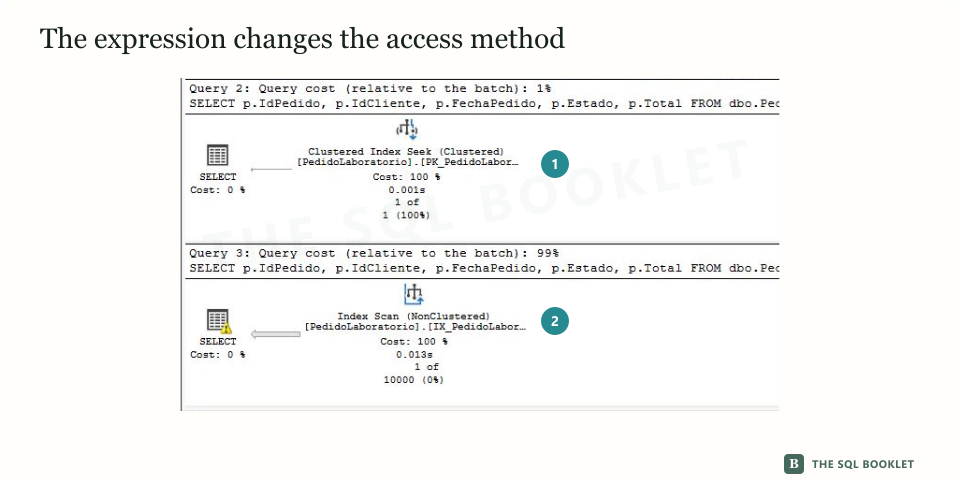
- 1Clustered Index Seek
The direct equality guides the search through PK_PedidoLaboratorio. It reads 1 row and returns 1.
- 2Index Scan
The conversion is evaluated while scanning IX_PedidoLaboratorio_FechaPedido. It reads 100,000 rows and returns 1.
Why the direct comparison allows a Seek
Before comparing the queries, enable Include Actual Execution Plan with Ctrl+M. Run each query separately and open the Execution plan tab next to Results and Messages. Keeping them separate prevents the expression and operator from being attributed to the wrong statement.
The direct comparison should produce a Clustered Index Seek, while the transformed column should produce an Index Scan. Exact index names and row counts depend on the structures and data available in the database.
IdPedido is the clustered index key. The condition p.IdPedido = @IdPedido preserves the same data type and compares that key directly with a value.
SQL Server can use the index order to navigate to value 75000. The plan represents that choice with Clustered Index Seek (Clustered) on PK_PedidoLaboratorio.
The Seek Predicates property records the condition that guides that navigation. In the observed execution, the operator read 1 row and returned 1 row.
A condition that lets SQL Server use a key to narrow the search is often described as SARGable. The term comes from search argument: the expression provides an argument that can be used to search an ordered structure. Being SARGable expands the optimizer’s options; it does not force a Seek for every volume and distribution.
Why transforming the column changes the access
In the second query, SQL Server no longer compares IdPedido directly with 75000. It must first calculate CONVERT(VARCHAR(12), p.IdPedido) for each value it considers.
The clustered index still exists and remains ordered by the integer value of IdPedido. That order does not organize the result of converting each value to text, so it does not provide the same direct path for evaluating the written expression.
The optimizer selected IX_PedidoLaboratorio_FechaPedido, a nonclustered index that already existed. It did not create the index during compilation. It traversed that index with an Index Scan and applied the conversion as a Predicate.
That index covers the query: it contains every column required to evaluate the predicate and return the result. FechaPedido is its key; IdCliente, Estado, and Total are included; IdPedido is also present as the clustered key used to locate rows. In this execution, scanning that structure was preferable to scanning the complete clustered index.
The choice does not establish a universal rule. A different column list, volume, statistics distribution, or index can produce another plan.
Where to verify the difference
In an actual plan, place the pointer over the operator or select it and press F4. Then compare properties that belong to the same operator.
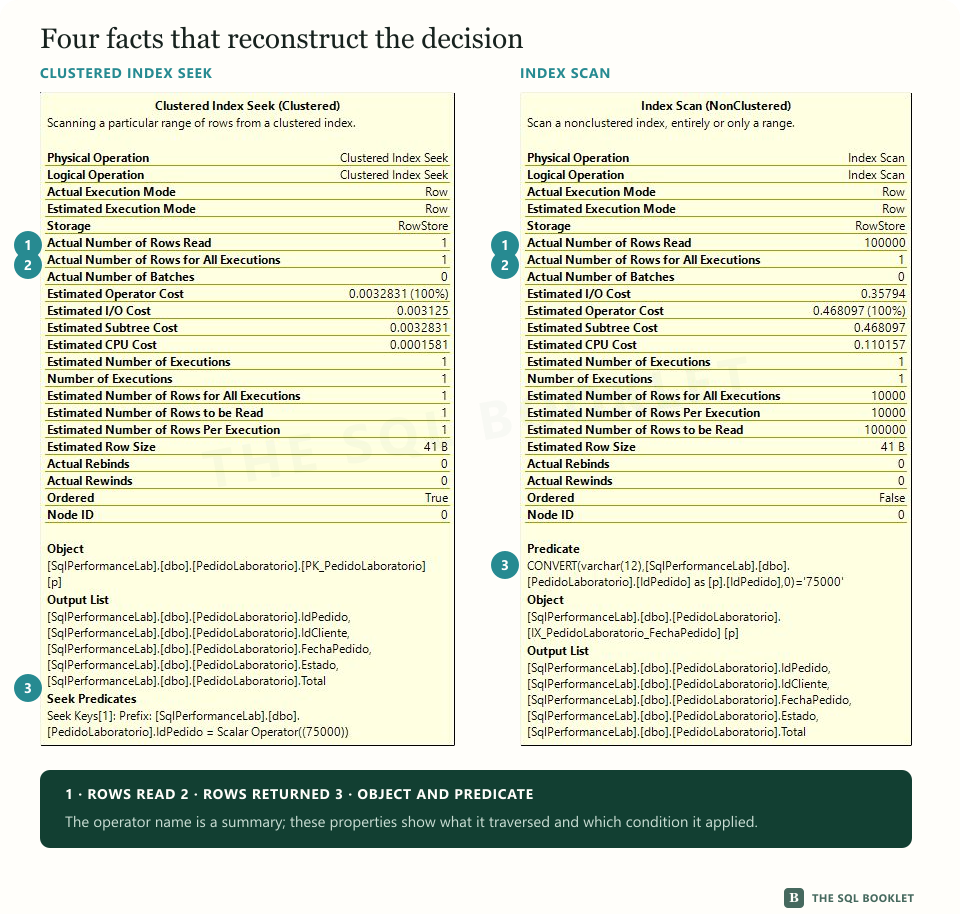
This case shows:
| Property | Clustered Index Seek |
Index Scan |
|---|---|---|
Actual Number of Rows Read |
1 | 100,000 |
Actual Number of Rows for All Executions |
1 | 1 |
| Object | PK_PedidoLaboratorio |
IX_PedidoLaboratorio_FechaPedido |
| Condition | Seek Predicates on IdPedido |
Predicate with CONVERT |
Rows read counts the rows inspected by the access operator before it finishes applying the predicate. Rows returned counts the rows the operator produced for the next point in the plan. The separation between them helps reveal work that is not visible when we look only at the final result.
Table Scan: traversing the table
A table without a clustered index is known as a heap. Its rows are not organized by a clustered key, although it may still have nonclustered indexes.
The following check creates a temporary table without indexes, searches for one row, and removes the table when finished. The change remains limited to the current session.
DROP TABLE IF EXISTS #PedidoSinIndice;

SELECT TOP (1000)
    p.IdPedido,
    p.IdCliente,
    p.FechaPedido,
    p.Estado,
    p.Total
INTO #PedidoSinIndice
FROM dbo.PedidoLaboratorio AS p
ORDER BY p.IdPedido;

SELECT
    p.IdPedido,
    p.IdCliente,
    p.FechaPedido,
    p.Estado,
    p.Total
FROM #PedidoSinIndice AS p
WHERE p.IdPedido = 750;

DROP TABLE #PedidoSinIndice;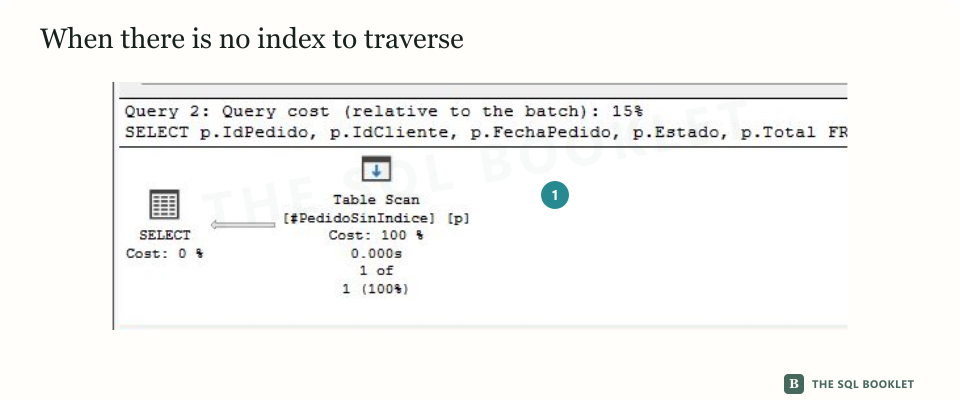
- 1Table Scan
The temporary table has no index. SQL Server inspects its 1,000 rows and returns the match.
The plan shows a Table Scan because no index provides another path for this search. The operator read all 1,000 rows in the temporary table and returned 1.
A Table Scan may be reasonable on a small table. It can also be appropriate when the query needs a substantial portion of the rows. Its presence opens an investigation; it does not prove a problem by itself.
An alternative that preserves the direct comparison
If the value arrives as text, we can validate and convert the input before comparing instead of transforming the column for every row.
DECLARE @IdPedidoTexto VARCHAR(12) = '75000';
DECLARE @IdPedido INT = TRY_CONVERT(INT, @IdPedidoTexto);

IF @IdPedido IS NULL
BEGIN
    THROW 51000, 'IdPedido does not contain a valid integer.', 1;
END;

SELECT
    p.IdPedido,
    p.IdCliente,
    p.FechaPedido,
    p.Estado,
    p.Total
FROM dbo.PedidoLaboratorio AS p
WHERE p.IdPedido = @IdPedido;
The conversion runs once against the input value. The predicate again compares integer IdPedido with another integer. Before adopting this form, confirm that the conversion preserves the rules of the received value and that invalid inputs receive the expected treatment.
What this still does not establish
The case demonstrates that these two expressions produced different access methods with the observed structures and data. It does not demonstrate that every Seek is inexpensive or that every Scan is avoidable.
A Seek may cover a broad range, read many rows, or execute an additional predicate. A Scan may traverse a small structure once and be the lowest-cost available alternative.
To assess the impact, relate the access method to reads, frequency, CPU, duration, concurrency, and the number of rows the query actually needs.
Reasonable next check
The next entry examines Key Lookup: an operation that may be small in one execution and accumulate work when repeated for many rows.