
Get the last order of each customer
Situation
We want to show a single row per customer with their most recent order. Grouping by customer and using MAX(FechaPedido) gets the date, but doesn’t safely fetch the ID and status of that same row.
First approach
SELECT
    IdCliente,
    MAX(FechaPedido) AS UltimaFecha
FROM dbo.Pedido
GROUP BY IdCliente;
The result answers when the last order occurred, but not what it was. Join again by date can return more than one row when there is a tie.
We need to number the orders within each customer. ROW_NUMBER() assigns a consecutive position and OVER defines how that set is formed and ordered: PARTITION BY starts a new numbering by customer and ORDER BY places the order that we will consider most recent first.
Final query
WITH PedidosOrdenados AS
(
    SELECT
        pe.IdPedido,
        pe.IdCliente,
        pe.FechaPedido,
        pe.Estado,
        ROW_NUMBER() OVER
        (
            PARTITION BY pe.IdCliente
            ORDER BY
                pe.FechaPedido DESC,
                pe.IdPedido DESC
        ) AS Posicion
    FROM dbo.Pedido AS pe
)
SELECT
    c.IdCliente,
    c.Nombre AS Cliente,
    p.IdPedido,
    p.FechaPedido,
    p.Estado
FROM PedidosOrdenados AS p
INNER JOIN dbo.Cliente AS c
    ON c.IdCliente = p.IdCliente
WHERE p.Posicion = 1
ORDER BY c.Nombre;
How it works
Descending date places the most recent order within each customer first.
IdPedido DESC acts as a tiebreaker: it adds a criterion when two dates are equal and ensures that only one row receives Posicion = 1. The outer query filters that position and adds the customer name.
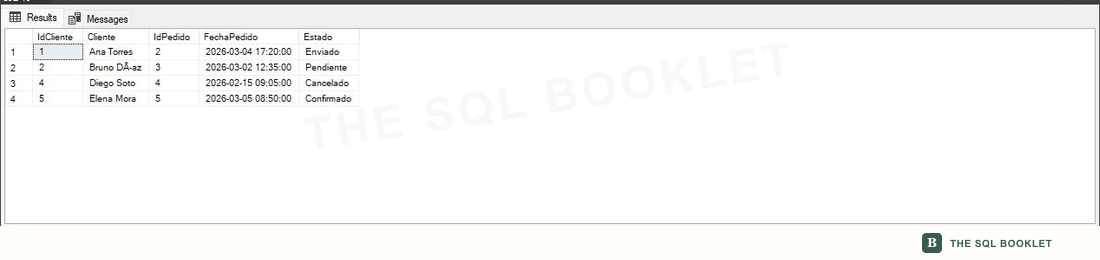
Expected result
| ClientId | Client | OrderId | OrderDate | State |
|---|---|---|---|---|
| 1 | Ana Torres | 2 | 2026-03-04 17:20 | Sent |
| 2 | Bruno Diaz | 3 | 2026-03-02 12:35 | Pending |
| 4 | Diego Soto | 4 | 2026-02-15 09:05 | Canceled |
| 5 | Elena Mora | 5 | 2026-03-05 08:50 | Confirmed |
Carla does not appear because she has no orders.
Verified in SSMS
Each customer with orders keeps one row: the row assigned Posicion = 1 within that customer’s partition.
Variation: include customers without orders
We start from Cliente and make a LEFT JOIN with the rows where Posicion = 1. The order columns will remain in NULL when one does not exist.
We can also change the filter within the CTE to get the latest confirmed order, which does not always match the latest order of any status.
Limits and cautions
The word “last” requires a complete order. A date without a tiebreaker does not define one row when two orders share the same instant; the result is no longer deterministic because another execution could choose the other tied row.
For many queries of this kind, an index—a structure that organizes values to make rows easier to access—starting with IdCliente and continuing with FechaPedido can reduce work. The right columns and order depend on other uses and the actual execution plan, the strategy chosen by SQL Server.