
Build a paginated search with optional filters
Situation
A product screen allows you to type part of the name, choose a category, and limit a price range. All filters are optional and the result must be divided into stable pages.
Paginating means returning only an ordered section of the result. OFFSET skips rows from previous pages and FETCH NEXT limits how many rows are delivered; both depend on a stable ORDER BY so that a row does not change pages arbitrarily.
Prepare parameters
Before querying, TRIM removes trailing spaces and NULLIF(..., N'') converts empty text to NULL. COALESCE provides a default value when a parameter is also NULL.
DECLARE @TextoEntrada NVARCHAR(120) = N'  USB  ';
DECLARE @IdCategoria SMALLINT = NULL;
DECLARE @PrecioMinimo DECIMAL(12, 2) = NULL;
DECLARE @PrecioMaximo DECIMAL(12, 2) = 1000;
DECLARE @PaginaSolicitada INT = 1;
DECLARE @TamanoSolicitado INT = 20;

DECLARE @Texto NVARCHAR(120) =
    NULLIF(TRIM(@TextoEntrada), N'');
DECLARE @Pagina INT =
    CASE WHEN COALESCE(@PaginaSolicitada, 1) < 1
         THEN 1 ELSE COALESCE(@PaginaSolicitada, 1) END;
DECLARE @TamanoPagina INT =
    CASE WHEN COALESCE(@TamanoSolicitado, 20) BETWEEN 1 AND 100
         THEN COALESCE(@TamanoSolicitado, 20)
         ELSE 20 END;
DECLARE @Desplazamiento BIGINT =
    CONVERT(BIGINT, @Pagina - 1) * @TamanoPagina;
An empty string becomes NULL. The page will never be smaller than one and the size is limited to a known range.
Final query
SELECT
    p.IdProducto,
    p.Nombre,
    c.Nombre AS Categoria,
    p.Precio,
    p.Existencia,
    COUNT(*) OVER () AS TotalResultados
FROM dbo.Producto AS p
INNER JOIN dbo.Categoria AS c
    ON c.IdCategoria = p.IdCategoria
WHERE p.Activo = 1
  AND
  (
      @Texto IS NULL
      OR p.Nombre LIKE N'%' + @Texto + N'%'
  )
  AND
  (
      @IdCategoria IS NULL
      OR p.IdCategoria = @IdCategoria
  )
  AND
  (
      @PrecioMinimo IS NULL
      OR p.Precio >= @PrecioMinimo
  )
  AND
  (
      @PrecioMaximo IS NULL
      OR p.Precio <= @PrecioMaximo
  )
ORDER BY
    p.Nombre,
    p.IdProducto
OFFSET @Desplazamiento ROWS
FETCH NEXT @TamanoPagina ROWS ONLY;
How it works
In a stored procedure, a parameter is a value received from outside. This standalone batch uses local variables so the example can run directly in SSMS; the application must validate values before calling a procedure or parameterized query. Each filter follows the “value absent or condition met” pattern. When the value is NULL, that part does not restrict the result.
ORDER BY includes IdProducto as a tiebreaker. Without a unique order, a row can change pages between runs even when the data has not changed. A unique order does not freeze the catalog: inserts, deletes, or name changes between requests can still move rows. If several pages must represent one logical snapshot, use an appropriate isolation strategy or a data version marker as well.
COUNT(*) OVER () reports how many rows the filters meet before paginating. The application can calculate the number of pages without running another query, although counting also has a cost.
Expected result
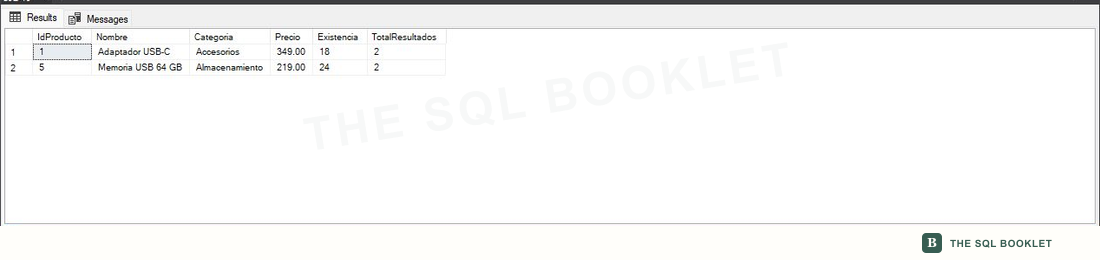
With the text USB and maximum price of 1000, the query returns active products whose name contains that text. Each row repeats TotalResultados to describe the entire set, not just the page.
Verified in SSMS
The search returns two products and repeats the full result count on both rows before the page limit is applied.
Variation: sort by price
We can change to ORDER BY p.Precio, p.IdProducto. We do not directly concatenate a column name received from the user. If ordering is configurable, we choose among known expressions or build dynamic SQL—SQL code formed during execution—with an allowlist.
Limits and cautions
Optional filters may produce uneven execution plans depending on their parameters. A plan is the strategy chosen by SQL Server. For high-volume searches, we measure alternatives such as specialized procedures, controlled recompilation, or parameterized dynamic SQL, where values are sent separately from the text.
The LIKE '%texto%' pattern normally cannot search from the beginning of a conventional index, a structure that organizes values to make rows easier to access. Large catalogs may need full-text search, a specialized index for locating words and linguistic forms, or another strategy.
The characters %, _, and [ have special meaning in LIKE. If they must be searched as literal text, define and apply an escape rule. Parameters keep values separate from SQL code, but they do not change pattern-matching semantics.
OFFSET must pass over earlier rows before returning a deep page. For large catalogs, measure keyset pagination, which resumes after the last ordered combination such as Nombre and IdProducto. Compute the offset as BIGINT or enforce a maximum page to avoid integer overflow.