
Show the first available phone of each customer
Situation
The system stores mobile phone and home phone in different columns. We want to present a single contact telephone number, preferring the mobile phone and avoiding treating an empty string or one composed of spaces as a valid number.
First approach
SELECT
    Nombre,
    COALESCE(TelefonoMovil, TelefonoCasa) AS Telefono
FROM dbo.Cliente;
This query handles NULL values—absent or unknown values—but does not detect a mobile number containing only spaces. In that case, COALESCE treats it as an existing value and never reaches the home phone.
To cover both cases, we first normalize each phone: transform different representations into a common form. TRIM removes spaces at both ends, and NULLIF(valor, '') turns the empty result into NULL. Then COALESCE can choose the first value that still contains a phone number.
TRIM is available in SQL Server 2017 and later. Without an explicit character list it removes ordinary spaces at the ends, not every possible invisible character; tabs and other separators require additional cleanup.
Final query
SELECT
    c.IdCliente,
    c.Nombre,
    COALESCE
    (
        NULLIF(TRIM(c.TelefonoMovil), N''),
        NULLIF(TRIM(c.TelefonoCasa), N''),
        N'Sin teléfono'
    ) AS TelefonoContacto
FROM dbo.Cliente AS c
WHERE c.Activo = 1
ORDER BY c.Nombre;
How it works
The expression is read from the inside out: clean, turn emptiness into absence, and choose among mobile, home, or the final label. The alias is the name assigned to the result and does not alter stored data.
Expected result
| ClientId | Name | TelephoneContact |
|---|---|---|
| 1 | Ana Torres | 7710001001 |
| 2 | Bruno Diaz | 7710001002 |
| 3 | Carla Ruiz | No phone |
| 5 | Elena Mora | 7710001005 |
Elena’s cell phone contains spaces, so the query continues to her home phone.
Verified in SSMS
The result shows which value remains after trimming spaces and converting empty strings to NULL.
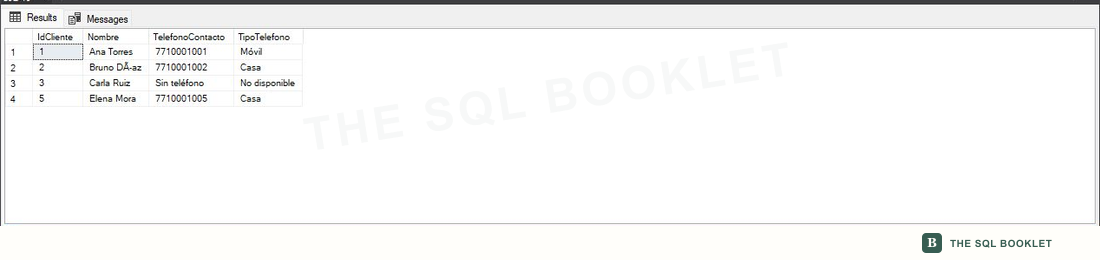
Variation: know the chosen origin
We can accompany the phone with a calculated label:
SELECT
    c.Nombre,
    COALESCE
    (
        NULLIF(TRIM(c.TelefonoMovil), N''),
        NULLIF(TRIM(c.TelefonoCasa), N''),
        N'Sin teléfono'
    ) AS TelefonoContacto,
    CASE
        WHEN NULLIF(TRIM(c.TelefonoMovil), N'') IS NOT NULL THEN N'Móvil'
        WHEN NULLIF(TRIM(c.TelefonoCasa), N'') IS NOT NULL THEN N'Casa'
        ELSE N'No disponible'
    END AS TipoTelefono
FROM dbo.Cliente AS c;
Limits and cautions
This query improves presentation but does not correct the stored data. If whitespace is a recurring problem, validate input and clean existing rows through a controlled process.
The text 'Sin teléfono' mixes a display state with phone numbers and can affect the resulting type or length. For an API—an interface through which systems exchange data—it may be preferable to return NULL and a separate column indicating availability.