
INNER JOIN: Preserve matches
We have customers on one table and orders on another. The two contain different information about the same operation: one identifies the person and the other records what happened with their order.
If we want to show only the customers who do have orders, we need to relate both tables and discard the rows that do not find a match. That’s the job of INNER JOIN.
The idea
INNER JOIN compares a column in the first table with a column in the second. The row appears in the result only when the condition indicated after ON is met.
The relationship does not have to use columns with the same name, although it is usually built with a primary key and a foreign key. The primary key uniquely identifies a row; the foreign key stores the value that points to that identifier from another table.
Syntax
SELECT
    tabla_a.Columna,
    tabla_b.OtraColumna
FROM TablaA AS tabla_a
INNER JOIN TablaB AS tabla_b
    ON tabla_b.IdRelacionado = tabla_a.Id;
The aliases tabla_a and tabla_b allow you to clearly indicate where each column comes from. In small queries they could be omitted, but they become especially useful when the tables share names such as Nombre, Estado, or FechaRegistro.
Example
In the example database, Cliente contains these rows:
| ClientId | Name |
|---|---|
| 1 | Ana Torres |
| 2 | Bruno Diaz |
| 3 | Carla Ruiz |
| 4 | Diego Soto |
| 5 | Elena Mora |
Pedido contains:
| OrderId | ClientId | OrderDate | State |
|---|---|---|---|
| 1 | 1 | 2026-03-01 10:15 | Confirmed |
| 2 | 1 | 2026-03-04 17:20 | Sent |
| 3 | 2 | 2026-03-02 12:35 | Pending |
| 4 | 4 | 2026-02-15 09:05 | Canceled |
| 5 | 5 | 2026-03-05 08:50 | Confirmed |
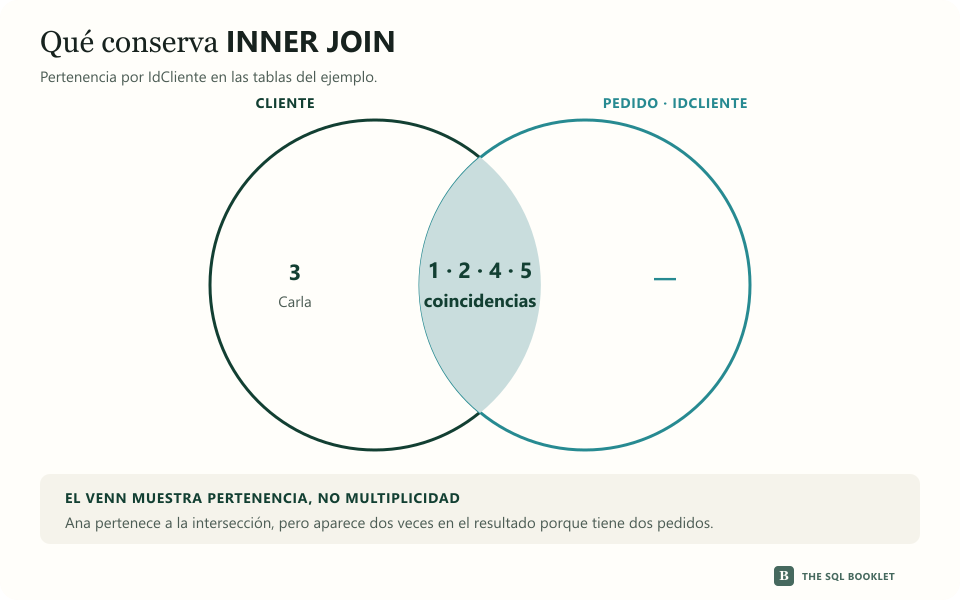
The intersection contains identifiers 1, 2, 4, and 5. The result preserves each match; That’s why Ana appears twice, once for each order.
We can join them using IdCliente:
SELECT
    c.IdCliente,
    c.Nombre,
    p.IdPedido,
    p.FechaPedido,
    p.Estado
FROM dbo.Cliente AS c
INNER JOIN dbo.Pedido AS p
    ON p.IdCliente = c.IdCliente
ORDER BY
    c.IdCliente,
    p.FechaPedido;
How to read the result
| ClientId | Name | OrderId | OrderDate | State |
|---|---|---|---|---|
| 1 | Ana Torres | 1 | 2026-03-01 10:15 | Confirmed |
| 1 | Ana Torres | 2 | 2026-03-04 17:20 | Sent |
| 2 | Bruno Diaz | 3 | 2026-03-02 12:35 | Pending |
| 4 | Diego Soto | 4 | 2026-02-15 09:05 | Canceled |
| 5 | Elena Mora | 5 | 2026-03-05 08:50 | Confirmed |
Carla does not appear because there is no order whose IdCliente is 3. That doesn’t mean Carla’s row has disappeared from Cliente; It was only left out of the result produced by this query.
Ana appears twice because she has two orders. INNER JOIN does not automatically produce one row per client: it produces one row for each join that meets the join condition.
What should be checked
An unexpected multiplication of rows usually indicates that the relationship was not one-to-one, meaning that one row could find more than one match in the other table. Before adding DISTINCT to hide it, check whether:
- a row of the first table has several related records;
- a condition was missing within
ON; - the columns used actually identify the relationship;
- the result needed to be grouped instead of keeping each match.
If we also need to show customers without orders, INNER JOIN no longer represents the full question. In that case we will use LEFT JOIN.